Introduction
Buying a refurbished iPhone can be a smart way to enjoy Apple’s premium features without paying the price of a brand-new device. Whether you’re looking for an affordable iPhone for everyday use, a better camera for photography, or an upgrade to a newer model, refurbished iPhones can offer excellent value for money.
However, not every refurbished iPhone is worth buying. Some devices have been professionally restored with quality replacement parts, while others may have hidden defects, poor battery health, or even security issues that make them risky purchases.
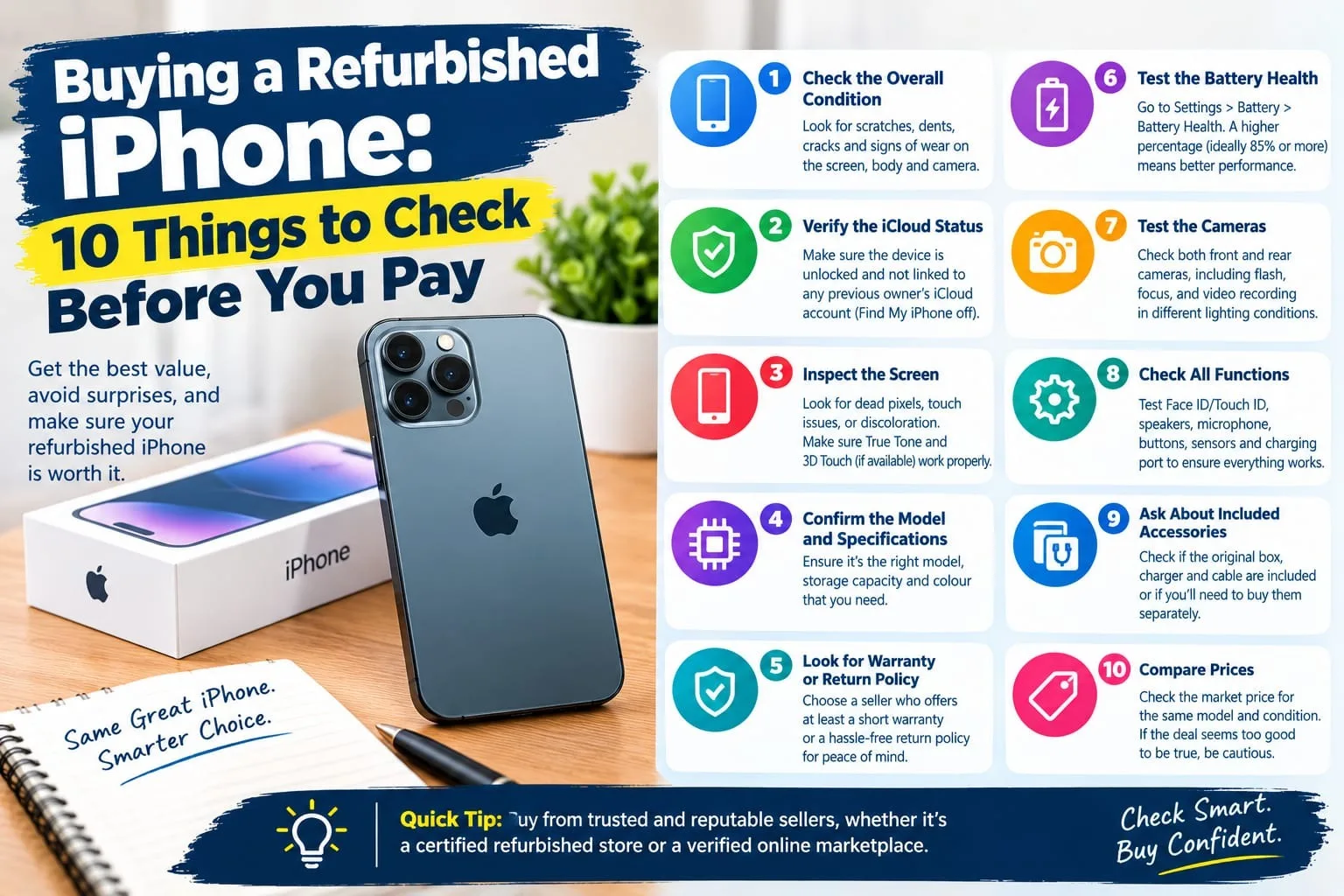
Before you hand over your money, it’s important to inspect the device carefully and verify its condition. In this guide, we’ll cover 10 essential things to check before buying a refurbished iPhone so you can make a confident and informed decision.
1. Check the iPhone’s IMEI and Serial Number
The first thing to check is the iPhone’s identity. Every iPhone has a unique IMEI number and serial number that can help you verify the device’s details.
To find them, open:
Settings → General → About
Here, you’ll find the IMEI, serial number, model number, and other important information.
Before paying, make sure that:
The IMEI displayed in Settings matches the device’s original packaging or documentation, if available.
The seller’s description matches the actual iPhone model and storage capacity.
The device’s history and ownership can be reasonably verified.
The IMEI is not reported as lost, stolen, or blocked by the relevant carrier.
You can also ask your mobile carrier or the relevant local authority how to check whether the device has been reported or blocked.
Pro tip: A clean IMEI check is useful, but it doesn’t guarantee that a phone has never been repaired, has no outstanding financial obligations, or won’t be blocked later.
2. Inspect the Battery Health
Battery health is one of the most important factors when buying a used or refurbished iPhone. A weak battery can cause shorter usage times, unexpected shutdowns, and reduced performance.
To check battery health, go to:
Settings → Battery → Battery Health & Charging
Depending on your iPhone model and iOS version, you’ll see information such as Maximum Capacity and Peak Performance Capability.
Here’s a general guide to battery condition:
90–100%: Generally excellent battery capacity.
85–89%: Usually good for everyday use.
80–84%: Usable, but you should consider the possibility of an earlier battery replacement.
Below 80%: Expect noticeably reduced capacity and investigate replacement costs.
These ranges are guidelines rather than guarantees. Actual battery performance also depends on usage, age, temperature, and battery condition.
If the battery has been replaced, ask whether it is a genuine Apple battery or a compatible third-party replacement. On supported models and iOS versions, the Parts and Service History section may provide additional information.
Pro tip: Don’t judge battery health by percentage alone. Ask whether the phone has been tested for charging problems, overheating, and unexpected shutdowns.
3. Verify the Display and Touchscreen
The display is one of the most expensive components to replace, so examine it carefully before buying.
Start by checking the screen for:
Cracks, scratches, dead pixels, and discoloration.
Green lines, flickering, or unusual brightness variations.
Uneven lighting or dark spots.
Touchscreen areas that fail to respond.
Signs that the screen is lifting away from the frame.
Open a blank white image and a dark image to make defects easier to spot. Then move an app icon around the screen to test touch responsiveness across all areas.
You should also check features such as True Tone, if your model supports it. However, True Tone alone is not a definitive test of whether the display is original.
On supported iPhones, visit Settings → General → About and look for Parts and Service History. Depending on the model and software version, the display may be identified as genuine, used, unknown, or otherwise flagged.
Pro tip: A replacement display is not automatically a bad sign. What matters is its quality, functionality, repair history, and whether the price reflects the device’s actual condition.
4. Test Face ID or Touch ID
Biometric authentication is essential for convenient unlocking, payments, and app security.
Depending on the model, your iPhone will use Face ID or Touch ID.
For Face ID:
Open Settings and select Face ID & Passcode.
Check whether Face ID is already configured.
With the seller’s permission, test face recognition.
Confirm that the phone can enroll a face successfully.
For Touch ID:
Open Settings and select Touch ID & Passcode.
Check whether fingerprint enrollment is available.
Test unlocking with an enrolled fingerprint, with the owner’s permission.
If the feature isn’t working, ask the seller to explain why. Problems can sometimes indicate damage or previous repairs involving sensitive components.
Important: Don’t pay full market value for a phone with nonfunctional biometric authentication unless you’re fully aware of the limitations and the discount justifies the risk.
5. Test the Cameras and Flash
One of the main reasons people buy iPhones is their camera performance. Before paying, test every camera and the flash.
Open the Camera app and check:
The front-facing camera.
All rear camera lenses available on the model.
Portrait mode, if supported.
Video recording and playback.
Autofocus and image stabilization, where applicable.
Flash functionality.
Take photographs of objects both near and far. Check the images for blur, strange spots, discoloration, or unusual focus problems.
Record a short video and play it back to ensure the image and sound are working properly.
Also inspect the camera lenses for scratches, cracks, dust, or condensation. If the camera produces persistent shaking, clicking noises, or blurry images, ask for further testing.
Pro tip: Test the camera in both bright and low-light conditions if possible. Some faults are difficult to notice in a well-lit shop.
6. Check the Charging Port, Cable, and Battery Charging
Charging issues can be inconvenient and costly, particularly if the device has a damaged port or an underlying power problem.
Connect the iPhone to a compatible charging cable and verify that it begins charging normally.
Check the following:
The charging port for visible dirt, corrosion, or damage.
Whether the charging connection is stable.
Whether the phone disconnects when the cable is moved gently.
Whether wireless charging works, if supported.
Whether the device becomes unusually hot during a short test.
Also test the speakers and microphone while you’re at the shop, since they are essential for calls and media playback.
Don’t insert metal objects into the charging port or attempt to clean it aggressively. If debris or corrosion is visible, ask a qualified technician to inspect it.
Pro tip: Confirm which charging cable and accessories are included. Accessories can affect the total cost of the purchase.
7. Inspect the Body for Physical or Water Damage
A refurbished iPhone may look clean on the outside but still have damage from drops, liquid exposure, or previous repairs.
Examine the device under good lighting and look for:
Dents or deep scratches on the frame.
Cracks around the camera lenses.
Gaps between the screen and body.
Bent edges or uneven seams.
Corrosion or unusual marks around the charging port and SIM tray, where applicable.
If the phone has a physical SIM tray, inspect the liquid contact indicator only if it can be viewed without dismantling the device. A qualified technician can perform a more thorough inspection when needed.
Remember that the absence of visible water damage doesn’t prove the phone has never been exposed to liquid.
Likewise, don’t assume that a refurbished iPhone retains its original water resistance. Previous repairs and aging seals can reduce protection.
Pro tip: Avoid testing water resistance by putting the phone in water. Liquid damage may not be covered by the seller’s warranty.
8. Make Sure Activation Lock Is Disabled
This is one of the most important security checks when buying a refurbished iPhone.
An iPhone linked to another person’s Apple Account may have Activation Lock enabled. If the previous owner hasn’t removed it, you may be unable to activate and use the device normally.
Before paying, ask the seller to:
Back up any data they need.
Sign out of their Apple Account.
Erase the iPhone using the appropriate settings.
Allow you to go through the initial setup process.
Ideally, connect the phone to Wi-Fi and complete activation before handing over the money. Confirm that the device doesn’t request the previous owner’s Apple Account credentials.
If a Remote Management screen appears during setup, investigate before proceeding. It may indicate that the device is managed by a business or organization.
Warning: Never rely solely on a seller’s promise that Activation Lock can be removed later. If the seller cannot demonstrate that the device can be activated, walk away.
9. Verify the Model, Storage, and Parts History
Not all refurbished iPhones are the same. Two phones of the same model may differ significantly in storage capacity, repair history, and overall condition.
Go to:
Settings → General → About
Check the model name, model number, serial number, and available storage information.
Make sure the specifications match the seller’s listing. For example, a phone advertised with 256GB of storage should not turn out to be a 128GB model.
Next, look for the Parts and Service History section, if available on your model and iOS version.
This section may reveal information about certain replaced components, including the battery, display, cameras, or other supported parts.
Pay attention to messages indicating that a component is unknown or cannot be verified. These messages don’t always prove that a component is defective, but they are a reason to ask questions and conduct further checks.
Also clarify what the seller means by “refurbished.” The term can describe anything from professional restoration with documented testing to a basic cosmetic cleanup.
Ask whether the phone has been repaired, which components were replaced, and whether the repairs come with a warranty.
Pro tip: A documented refurbishment with a clear repair history is generally preferable to a phone advertised as refurbished without any supporting information.
10. Check the Warranty, Return Policy, and Final Price
Even if an iPhone passes your inspection, the purchase isn’t complete until you understand the seller’s terms.
Before paying, ask these questions:
Is there a written warranty?
How long does the warranty last?
Which faults and components are covered?
Is the battery covered?
Can you return the device if a fault appears shortly after purchase?
Are refunds available, or does the seller offer repairs or exchanges only?
Is the phone eligible for network use in your country?
Are any taxes, registration fees, or additional charges applicable?
If you’re buying in Pakistan, check the device’s IMEI and PTA compliance status through the relevant official channels before purchasing. A phone that looks genuine and works on Wi-Fi may still be unsuitable for local cellular use if its registration or blocking status is an issue.
You should also compare the total cost with other refurbished devices. Include potential battery replacement costs, missing accessories, repairs, and any applicable registration charges.
Finally, request a receipt showing the model, IMEI, purchase price, warranty terms, and seller details.
Pro tip: A slightly more expensive refurbished iPhone from a reputable seller with a written warranty may offer better value than a cheaper device with no returns or support.
Bonus: A Quick Checklist Before You Pay
Use this checklist while inspecting the phone in person.
IMEI and serial number checked.
Battery health reviewed.
Screen and touchscreen tested.
Face ID or Touch ID working.
Front and rear cameras tested.
Charging port and charging function checked.
Speakers, microphones, and buttons tested.
Physical condition inspected.
Activation Lock disabled and setup verified.
Model, storage, parts history, warranty, and network eligibility confirmed.
Don’t rush through these checks just because the seller says other buyers are waiting. A legitimate seller should give you reasonable time to inspect the device.
Final Thoughts
Buying a refurbished iPhone can be an excellent way to save money while enjoying Apple’s ecosystem, but the key is knowing exactly what you’re purchasing.
Always check the battery, screen, cameras, charging system, biometric features, IMEI, and Activation Lock status. Review the repair history, confirm network eligibility, and get the seller’s warranty and return policy in writing.
Most importantly, never pay for a refurbished iPhone you haven’t adequately tested or cannot activate yourself.
A little patience before purchasing can help you avoid expensive repairs and give you greater peace of mind.
Frequently Asked Questions
Is buying a refurbished iPhone worth it?
Yes, provided the phone is in good condition, properly tested, fairly priced, and sold with a clear warranty or return policy. The savings should justify any compromises in battery life, cosmetic condition, or remaining software support.
What battery health is good for a refurbished iPhone?
A maximum capacity of 85% or higher is a useful general target. Battery health below 80% deserves particular attention because the battery may need replacement soon, depending on performance and your usage.
Can a refurbished iPhone be fake?
Yes, fraudulent sellers can misrepresent devices or their components. Check the model information, software, cameras, IMEI, repair history, and activation process. For greater confidence, buy from a reputable seller and consider an independent inspection.
How can I tell if an iPhone has been repaired?
On supported models and software versions, check Settings → General → About → Parts and Service History. You can also look for visible repair signs, ask for documentation, and have a qualified technician inspect the phone.
Should I buy a refurbished iPhone without a warranty?
It’s generally safer to choose one with a written warranty and a reasonable return period. If you consider a device without a warranty, the discount should be substantial enough to account for the added risk, and you should inspect it particularly carefully.
What is the most important thing to check before buying a refurbished iPhone?
Activation Lock is one of the most critical checks because a device linked to a previous owner’s account may be unusable. Battery condition, IMEI status, and the phone’s overall functionality are also essential.
Need this fixed?
We repair these at our workshop at 47 Hampstead High Street, London NW3 1QG. Read more about phone repair in Hampstead, or book a repair online.