
How to Protect Your Smartwatch from Water Damage
How to Prevent Smartwatch Water Damage: A Complete Care Guide
Smartwatches are built to handle our daily grinds, but water damage remains one of the most common reasons these devices end up on a repair bench. Even if your watch claims to be “water-resistant,” improper use or pushing its limits can lead to a costly paperweight.
If you want to extend your device’s life and avoid expensive repairs, here is everything you need to know about protecting your smartwatch from liquid damage.
1. Understand Your Smartwatch Water Resistance Rating
Many people mistake “water-resistant” for “waterproof”—but no smartwatch is completely waterproof. Manufacturers use specific rating systems to show exactly how much moisture a device can handle:
IP68 Rating: Protects against dust and fresh water immersion up to 1.5 meters for up to 30 minutes. Perfect for rain or sweat, but not for swimming loops.
5 ATM Rating: Means the watch can withstand pressure equivalent to a depth of 50 meters. It safely handles splashes, heavy rain, and shallow swimming.
10 ATM+ Ratings: Found on rugged multi-sport watches; these are safe for high-speed water sports and snorkeling.
Pro Tip: Water resistance isn’t permanent. The rubber seals inside your watch naturally degrade over time, lowering its protection.
2. Keep Your Smartwatch Out of Hot Showers and Saunas
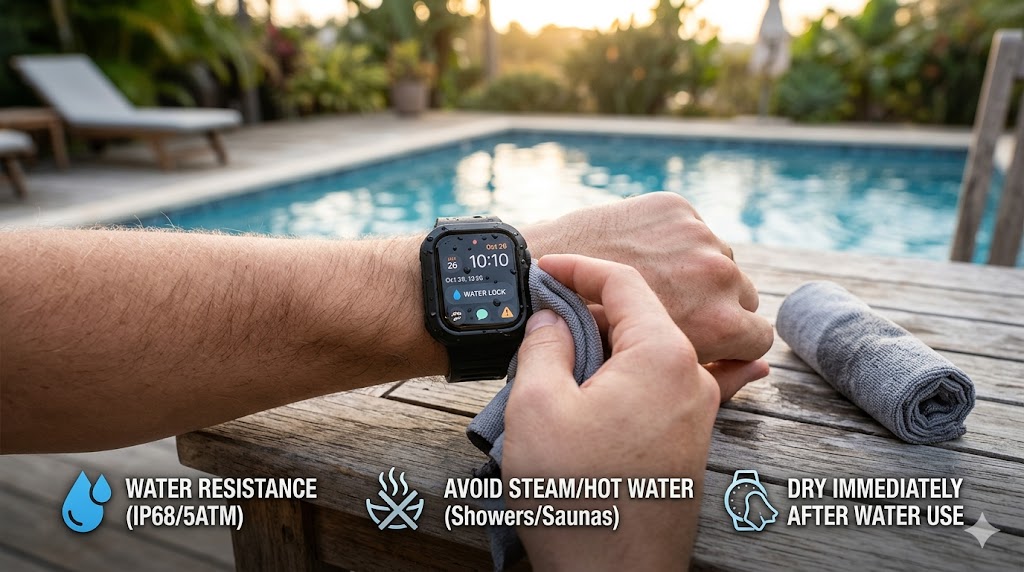
Can you wear your smartwatch in the shower? Generally, no. It’s usually not the water that kills the device—it’s the heat and steam.
Taking your watch into hot showers, saunas, or steam rooms causes the metal and plastic parts to expand and contract at different rates. This quickly weakens the internal waterproof seals. Furthermore, soaps, shampoos, and conditioners are corrosive and will eat away at the protective coatings.
3. Dry and Clean Your Device Immediately
Whenever your watch gets wet—whether from a workout, a rainstorm, or a swim—take a few seconds to dry it off properly.
Wipe the casing and band with a soft, lint-free microfiber cloth.
Pay extra attention to the areas around the buttons, microphone vents, and charging ports.
Never plug in a wet smartwatch. Charging a device with moisture in the port can short-circuit the internal electronics instantly.
4. Don't Press Buttons Underwater
It is a natural reflex to want to check your lap times or change a song while swimming, but pressing physical buttons underwater is a major risk. Pushing a button compresses its seal, which can actively force water directly into the small openings of the watch case. If your watch has a “Water Lock” or “Swimming Mode,” turn it on before you get in the water to disable accidental touch commands.
5. Watch for Smartwatch Water Damage Symptoms
Sometimes, water entry happens slowly. Keep an eye out for these early warning signs that moisture has breached the case:
Fog, condensation, or moisture droplets trapped under the screen glass.
The touchscreen becomes glitchy, phantom-touches on its own, or stops responding entirely.
Speaker sounds or haptic vibrations become muffled or distorted.
The watch randomly shuts down, refuses to turn on, or won’t hold a charge.
Wrap Up: What to Do If Your Watch Gets Wet
Taking a few simple precautions—like keeping it out of the steam room and drying it after a workout—will keep your smartwatch running smoothly for years.
If your smartwatch is already showing signs of water damage, do not put it in rice. Rice dust can get inside the ports and compound the problem. Instead, turn the device off completely and bring it to a professional repair service immediately. A technician can safely open the casing, dry the components, and replace the compromised seals before permanent corrosion sets in.