
Introduction
A laptop that refuses to charge can quickly become a major inconvenience, especially when you rely on it for work, study, business, or everyday tasks. While a faulty charger or worn-out battery can cause charging problems, the charging port itself may also be responsible.
The charging port is one of the most frequently used physical connections on a laptop. Repeated plugging and unplugging, accidental pulls on the charging cable, dust buildup, and physical impact can eventually damage it. Recognising the warning signs early can help prevent further problems.
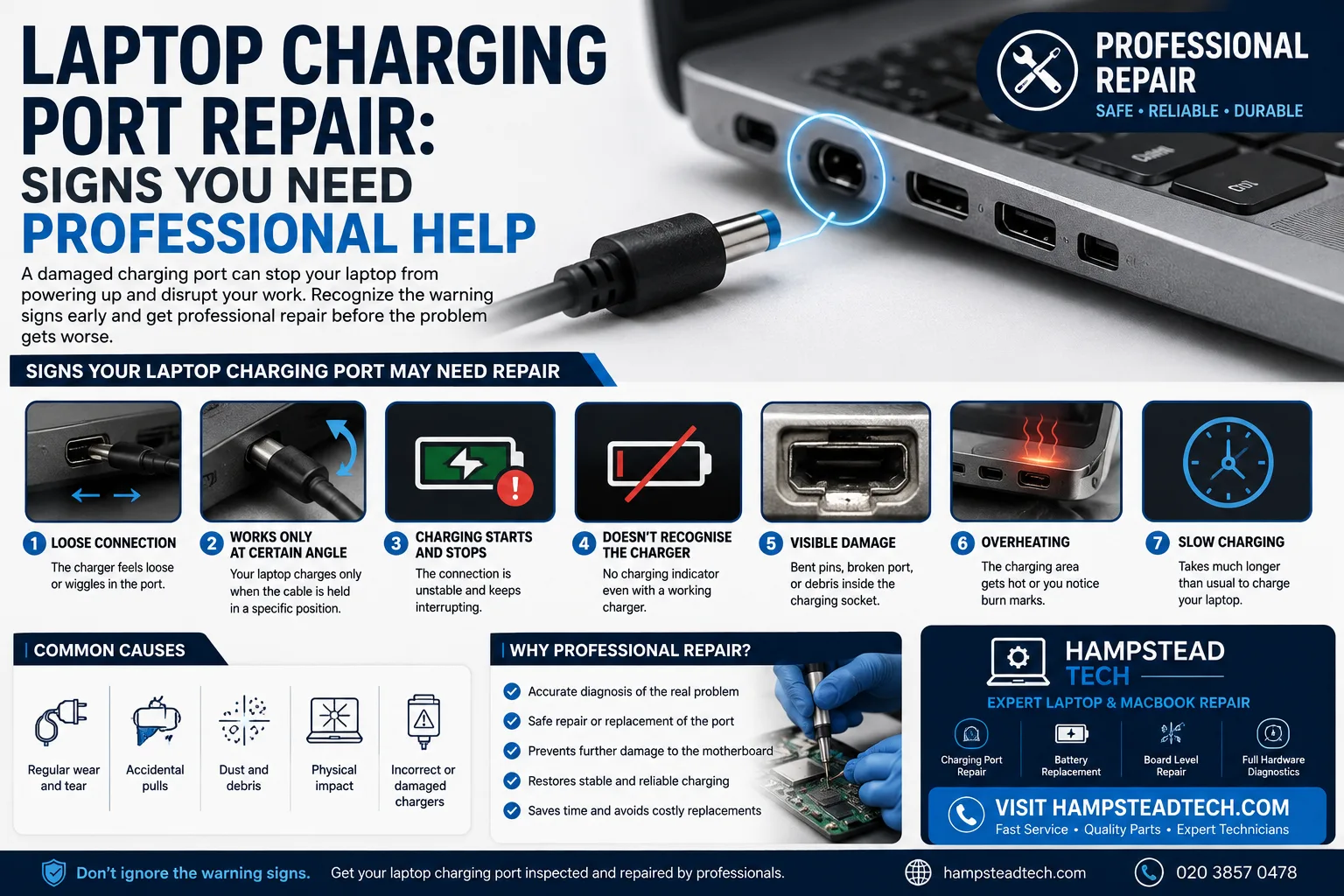
What Does a Laptop Charging Port Do?
The charging port provides the connection between your laptop and its power adapter. Depending on the model, a laptop may use a traditional DC charging jack, USB-C charging port, or another proprietary connection.
When the port becomes damaged, the laptop may receive inconsistent power or stop recognising the charger completely. However, charging problems can also be caused by the adapter, cable, battery, or internal power circuitry, so proper diagnosis is important.
Signs Your Laptop Charging Port May Need Repair
1. The Charger Feels Loose
One of the clearest warning signs is a charging plug that no longer fits securely.
If the connector moves around inside the port, falls out easily, or feels noticeably different from before, the port may be worn or physically damaged. A loose connection can also result from damaged internal components or weakened connections.
2. Your Laptop Only Charges at a Certain Angle
Do you have to move or hold the charging cable in a particular position to keep your laptop charging?
This is a common indication of a damaged port or connection. If charging stops whenever the cable moves slightly, continuing to use it in this way can potentially make the problem worse.
3. Charging Keeps Starting and Stopping
An intermittent charging connection is another important warning sign.
You may notice the charging indicator repeatedly switching between charging and battery power. This can happen when the port is unable to maintain a stable electrical connection.
Don’t ignore this issue simply because the laptop still charges occasionally. Early professional diagnosis may prevent a minor port problem from developing into a more complicated hardware repair.
4. The Laptop Doesn’t Recognise the Charger
If you connect a compatible charger and the laptop shows no indication that external power is connected, there could be a problem with the charger, cable, charging port, battery, or internal power circuitry.
Before assuming the port is faulty, test a known-compatible charger if possible and inspect the cable for visible damage. If the problem continues, professional diagnosis can identify the actual cause.
5. You Notice Physical Damage
Look carefully at the charging port for signs such as:
Bent or damaged pins
Cracked plastic around the port
A port that moves inside the laptop
Burn marks or discolouration
Debris blocking the connection
Visible damage is a strong reason to stop forcing the charger into the laptop and have the device inspected by a technician.
6. The Charging Area Becomes Unusually Hot
Some warmth during charging can be normal, but unusual heat around the charging connector should not be ignored.
A damaged or unstable connection can create excessive resistance and heat. If you notice overheating, burning smells, sparks, or discolouration around the charging port, disconnect the charger and seek professional assistance.
7. Your Laptop Charges Much More Slowly
A laptop that suddenly takes significantly longer to charge may have a problem with its charger, battery, charging port, or power-management hardware.
If you’ve already ruled out an unsuitable or faulty charger, the charging port should be checked as part of a professional diagnosis.
What Can Cause Charging Port Damage?
Laptop charging ports can become damaged for several reasons:
Regular Wear and Tear
Frequent plugging and unplugging can eventually wear down the port and its internal connections.
Accidental Pulls
Pulling or twisting the charging cable while it is connected can put stress on the port and surrounding components.
Dust and Debris
Dust and lint can interfere with the connection between the charger and port. A blocked port can prevent the plug from seating correctly.
Physical Impact
Dropping a laptop or accidentally hitting the charging connector can damage the port or its connection to the motherboard.
Incorrect or Damaged Chargers
Using an unsuitable power adapter or continuing to use a damaged charging cable can contribute to charging problems and potentially cause hardware damage.
Can You Fix a Laptop Charging Port Yourself?
Some basic checks are safe to perform. You can inspect the charger and cable for visible damage, try another compatible charger, and check the port for obvious debris.
However, do not force objects into the charging port or attempt soldering without the appropriate electronics-repair skills and equipment. Charging ports may be connected directly to the laptop’s motherboard, and an inexperienced repair attempt could cause additional damage.
Professional repair may involve replacing a modular charging port, repairing its connection, or carrying out board-level work depending on the laptop model and fault.
Why Professional Laptop Charging Port Repair Matters
A professional technician can diagnose whether the problem is actually the charging port or another part of the laptop’s power system.
A proper repair may include:
Inspecting the charging port and connector
Testing the charger and charging cable
Checking the battery
Examining the motherboard and power circuitry
Repairing or replacing a damaged port
Testing the laptop after repair
This approach helps ensure that the underlying problem is addressed rather than simply replacing a component unnecessarily.
How to Prevent Future Charging Port Problems
A few simple habits can help extend the life of your laptop’s charging port:
Insert and remove the charger gently.
Avoid pulling the laptop by its charging cable.
Don’t put unnecessary pressure on the connected cable.
Keep the charging port clean and free from debris.
Use a compatible, good-quality charger.
Avoid using the laptop where the charging cable can easily be caught or pulled.
Have unusual charging behaviour checked early.
Professional Laptop Repair at Hampstead Tech
If your laptop charger keeps disconnecting, only works at a certain angle, or the charging port feels loose, professional assistance can help identify the problem before it becomes more serious.
Hampstead Tech provides laptop and MacBook repair services, including charging-related repairs and other hardware problems. Their listed services include laptop and MacBook repairs, charging port repair, battery replacement, and board-level microsoldering.
Visit Hampstead Tech to learn more about laptop repair services.
Final Thoughts
A faulty laptop charging port can start with a small symptom—a loose connector or occasional charging interruption—and eventually prevent the laptop from charging altogether.
If your laptop only charges when the cable is positioned a certain way, repeatedly disconnects, shows visible port damage, or becomes unusually hot around the connector, don’t ignore the warning signs. Check the charger first, avoid forcing the connection, and consider professional diagnosis.
Timely laptop charging port repair can help restore reliable power and keep your device working when you need it most.
Need this fixed?
We repair these at our workshop at 47 Hampstead High Street, London NW3 1QG. See our laptop and MacBook repair service, or book a repair online.